From 20 November, Meta’s terms reach behind your login. What small businesses and marketers can do.
From 20 November, Meta's terms allow it to create its own login on your website. Three technical locks to keep its crawlers out: robots.txt, a server-side block and a protected sign-up.
From 20 November, Meta’s terms allow it to create its own login on your website. You grant the permission yourself, without signing anything: using Facebook or Instagram for business is enough.
Crawlers have always read the public part of the web. What is new is that Meta’s terms open a way behind the login: to the client portal, the online course, the members’ area. The coverage so far has been about news publishers and AI training. This article is about the small business that keeps its best material behind a sign-up form, and about the marketer who reads the sign-up numbers.
What do Meta’s new Commercial Terms allow?
Meta’s updated Commercial Terms take effect on 20 November 2026. Anyone who keeps using Facebook or Instagram for business after that date accepts them. According to the reports, there is no opt-out other than stopping business use of Meta’s products. The date was originally 30 October; Meta postponed it on 23 October after publishers complained, without changing the wording.
The new clause lets Meta, or anyone acting on its behalf, use “automated software” (crawlers, bots, spiders, user agents) to access, index, cache and collect content from the domains, websites and URLs associated with your business. Meta may also create “test credentials” to do it.
The terms do not define test credentials. James Grimmelmann, a law professor at Cornell University, told Nieman Lab that on this wording Meta could sign up as a fake user to get past a registration wall. Nieman Lab asked Meta whether that covers paid content; Meta did not answer. Meta’s spokesperson, Andy Stone, said the reports were wrong: Meta is not changing how it uses its crawlers, and site owners can still control them with robots.txt.
What is known, and what is not:
- The terms permit test accounts. Nobody has shown that Meta creates them.
- Which crawler would log in, and under what name, is not known.
- The terms let Meta use what it collects to develop, improve and research its ads and business products. An earlier draft reportedly said “train”; that word was removed after publishers objected, “develop” stayed. Lawyers say development can cover training AI models.
Why does it matter what sits behind the login?
Because for most small businesses, that is where the value is. The paid course, the client guide, the members’ analysis, the template library: this is the knowledge the business sells. A public blog post is written to be read by anyone, including machines. Material behind a sign-up form was put there so that it would not be.
A closed forum or community group is a special case. A test account sees what any member sees, not other users’ private data. But where members see each other’s posts behind the login, those posts are exposed too.
Will a Meta test account distort your sign-up numbers?
One account, once, very little. A single extra registration among a month of real ones will not change a report, and it is not the reason to act.
The risk grows if crawling becomes routine. If Meta’s crawlers started reading registration-protected content every night, for training, signing up again each time, bot accounts would pile up. They would inflate sign-up counts and conversion rates, fill the CRM with contacts nobody can sell to, receive welcome sequences, and lower the open and reply rates of every email after them. Where the sign-up is a conversion event reported back to an ad platform, the platform would optimise toward people who look like a bot. Nothing shows Meta does this today. The terms would allow it, and from outside you would see it only in the numbers.
I have seen the small version of this. At a Swiss start-up where I worked, the developers kept testing the registration, and the analytics counted each of them as a real visitor and a real sign-up. The report showed the team’s behaviour, not the customers’. Someone else’s test account distorts the numbers the same way, except you do not know it is there.
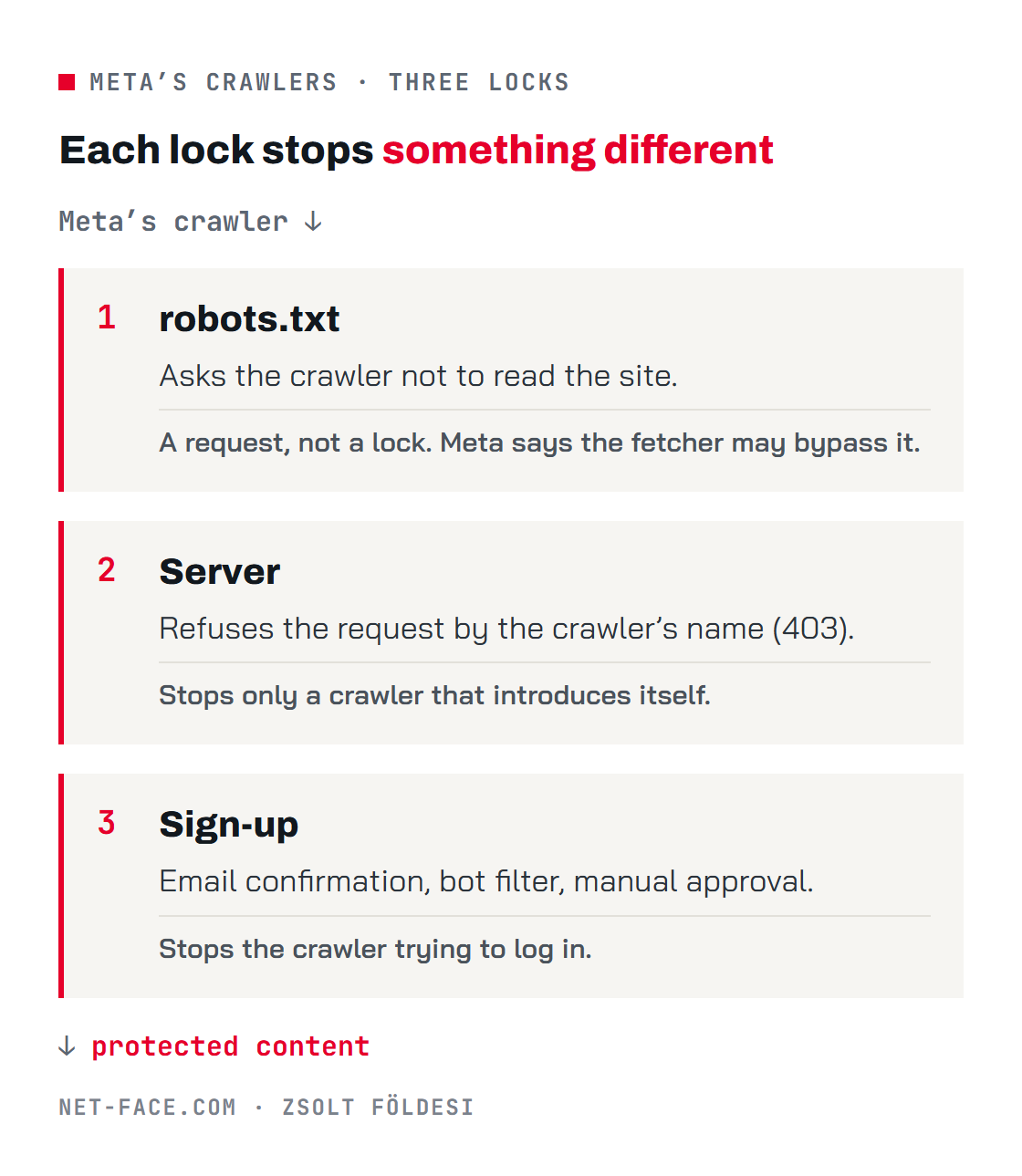
The three sections below each describe one lock. Each one stops something different, so where valuable content sits behind the login, you need all three.
First lock: what can robots.txt block?
robots.txt is a small text file at the root of your site (for example example.com/robots.txt) that tells crawlers where they may go. Meta names five crawlers on its own crawler page. Not all of them are worth blocking:
| Crawler | What it is for, according to Meta | Block it? | Does it obey? |
|---|---|---|---|
| meta-externalagent | Among other things, training AI models | Yes, if you do not want your content used for that | Meta says yes |
| meta-externalfetcher | Fetching a link when a user asks for it (for example in Meta AI) | Behind the login, yes; on public pages, your call | Meta says it may bypass robots.txt |
| meta-externalads | Developing ad products | Your call | The page does not say it bypasses |
| meta-webindexer | Search results in Meta AI | Only if you accept not being cited by Meta AI | The page does not say it bypasses |
| facebookexternalhit | Link previews (title, description, image) | No: without it, your links shared on Facebook have no image | May bypass for security checks |
Blocking the two main crawlers, added to the end of robots.txt:
User-agent: meta-externalagent Disallow: / User-agent: meta-externalfetcher Disallow: /Do not add a block for facebookexternalhit.
The whole site, or only part of it? The example above, like every example in this article, covers the whole site: / means every address on it. To close only the protected part, when it has its own address (for example /course/ or /account/), put that path in place of /:
User-agent: meta-externalagent Disallow: /course/ User-agent: meta-externalfetcher Disallow: /course/If the protected content has no address of its own and appears on the same page after login, a partial block is not possible: block the whole site, or rely on the third lock.
What robots.txt cannot do: it is a request, not a lock. Well-behaved crawlers follow it; nothing forces them to. Meta itself says meta-externalfetcher may bypass it, because it acts on a user’s request. Crawlers may also cache the file for up to 24 hours, so a change does not take effect at once.
Second lock: how do you block crawlers on the server?
A server-side block does not ask the crawler, it refuses it: instead of the page, the crawler gets a 403 error (“access denied”). The server recognises the visitor by the user agent in the request header.
If your site runs behind Cloudflare: under Security, WAF, create a custom rule with this expression and the action “Block”:
(http.user_agent contains "meta-externalagent") or (http.user_agent contains "meta-externalfetcher")Cloudflare also has a switch that blocks known AI crawlers in one go. It is convenient, but it blocks more than Meta.
Apache: your developer adds this to the .htaccess file:
RewriteEngine On RewriteCond %{HTTP_USER_AGENT} (meta-externalagent|meta-externalfetcher) [NC] RewriteRule .* - [F,L]Nginx: in the server configuration:
if ($http_user_agent ~* "(meta-externalagent|meta-externalfetcher)") { return 403; }Only the protected part: the rules take the path as well (here /course/):
Cloudflare: (http.user_agent contains "meta-externalagent" or http.user_agent contains "meta-externalfetcher") and starts_with(http.request.uri.path, "/course/") Apache (.htaccess), one line before the RewriteRule: RewriteCond %{REQUEST_URI} ^/course/ Nginx, inside the block for the protected part: location /course/ { if ($http_user_agent ~* "(meta-externalagent|meta-externalfetcher)") { return 403; } }On Nginx, put it in the existing location /course/ block if there is one, or the other settings for that path may be lost. Your developer can check.
WordPress: several plugins block AI crawlers with one click. Check the list before you switch one on: it may also block the crawlers that ChatGPT or Perplexity use to find and recommend your business.
The limit: the server only recognises a crawler that introduces itself. A crawler posing as an ordinary browser gets through. Meta does not publish a verifiable list of IP addresses on its crawler page, so the block relies on the names.
What do you lose if you block the whole site?
Meta has a public AI service. Meta AI runs in WhatsApp, Messenger, Instagram and Facebook and as its own app, and it can search the web. Meta’s crawler page says that allowing meta-webindexer helps Meta AI cite and link to your content, and meta-externalfetcher reads your page when a user asks Meta AI about it.
Block these crawlers across the whole site and Meta AI can cite you less, and cannot recommend your business from what your site says. In the same way, a search engine leaves out a page its crawler cannot read.
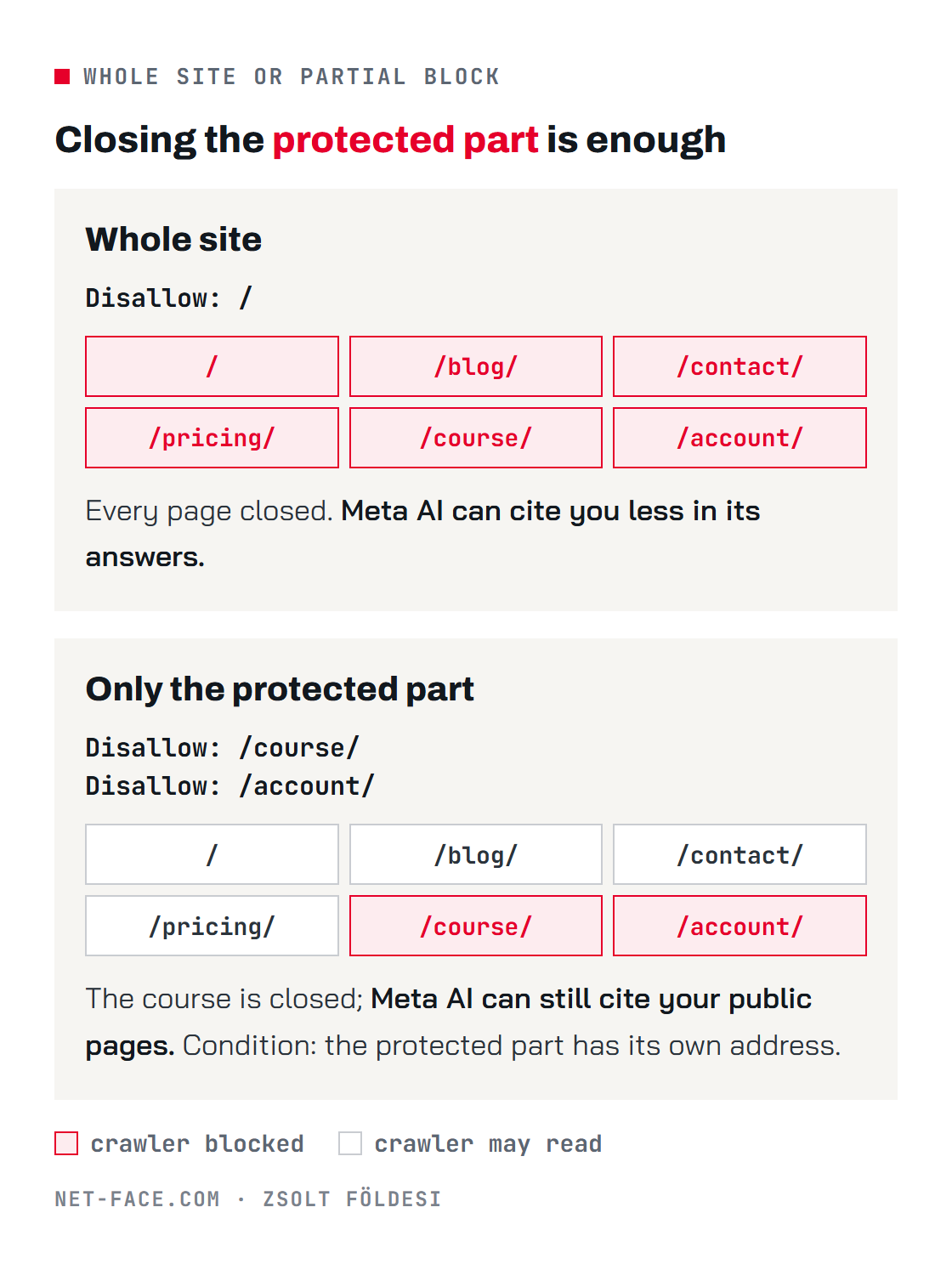
So for most businesses the partial block is the better choice: close what is behind the login, and decide what to allow on the public pages. meta-externalagent, which Meta says collects for training AI models, can be blocked across the whole site while meta-webindexer, which serves Meta AI search, stays free.
Third lock: how do you protect the sign-up itself?
Once a crawler has an account and logs in, robots.txt and a block by name no longer matter. The sign-up itself has to be hard to pass:
- Email confirmation: the account only works once someone clicks the confirmation email.
- A bot filter on the sign-up form: for example Cloudflare Turnstile or Google reCAPTCHA.
- Manual approval or payment where the content is truly valuable: a course, a client portal, a closed group.
- A look through existing accounts: odd email addresses, empty profiles, many new accounts in a short time. These are the signs.
For marketers there is a fifth step: keep bot sign-ups out of the numbers. Count a lead only after the email is confirmed, send the conversion event to ad platforms at that point rather than at form submission, and keep unconfirmed accounts out of nurture sequences.
It is also worth saying in your own terms of use that accounts created by automated means and automated data collection are not allowed. What that is worth against Meta’s terms is a legal question I cannot answer.
What if your site does not run on your own server?
On a hosted platform, robots.txt and the firewall are in the provider’s hands, or only partly in yours.
- Shopify: robots.txt is edited in the theme’s robots.txt.liquid template.
- Wix: robots.txt is edited in the SEO settings.
- Course and membership platforms: each one differs. Ask the provider whether it blocks meta-externalagent and meta-externalfetcher, and how it protects sign-ups against automated accounts.
How can you check that the block works?
I built a free automatic checker: Meta robot checker. Enter your domain and it looks at two things:
- What robots.txt allows for each of Meta’s five crawlers, and whether facebookexternalhit is left free.
- What your server answers when a page is requested under the names of Meta’s crawlers: does it let them in or refuse them.
What it cannot check: whether Meta actually obeys a block. Nobody can test that from outside. The checker shows whether every rule is in place on your side.
Frequently asked questions
Is robots.txt enough? For a crawler that obeys it. Meta says meta-externalagent does and meta-externalfetcher may not. Where valuable content sits behind the login, add the server-side block and the protected sign-up.
If I block Meta’s crawlers, will my link previews on Facebook disappear? Not if you leave facebookexternalhit free. None of the rules above touch it.
Will Facebook send me fewer visitors if I block the crawlers? Link previews and ads keep working while facebookexternalhit is free. If you block meta-webindexer or meta-externalfetcher across the whole site, you appear less often as a source in Meta AI answers. A block on the logged-in part alone does not affect this.
What if my site has no login? Then the sign-up part does not apply. Crawlers could always read your public content; robots.txt lets you decide whether Meta’s training crawler reads it.
Do I have to accept the terms? According to the reports, you cannot opt out while using Facebook or Instagram for business. This is not legal advice: if the terms affect your business, ask a lawyer.
Sources: Meta’s Commercial Terms preview (facebook.com/legal/commercial_terms_preview; Hungarian, UK and US editions, read 23 and 28 October 2026); Meta’s crawler page (developers.facebook.com/docs/sharing/webmasters/web-crawlers); Nieman Lab, 15 October 2026; Reuters, Digiday and PPC Land on the postponement to 20 November.